A job search should leave you energy for the interview
A small system for application portals, verification emails, and follow-ups—so administration stops consuming the search.
Updated
By the fifth application portal, you may have spent an afternoon entering your own history and barely thought about the work you want next. Another password, another verification email, another form that has put a job title in the wrong field.
This comes up in client conversations because the small tasks accumulate. A search already asks for hope, attention, and patience. I want the administration to take up less of all three, so there is something left for the conversation that could actually lead somewhere.
Give the process somewhere to live
A useful system answers a few ordinary questions. Where did I apply? Which version of my CV did I send? What stage am I at? What do I need to do next, and when? If you can answer those without searching across several inboxes and browser tabs, you have most of what you need.
The system can be a simple table. It does not have to connect to every platform or calculate a score for every opportunity. The system is too complicated if updating it keeps you from improving an application or talking to someone who could help.
I would separate three things: login details, application records, and interview notes. They serve different purposes. A password manager is for access. A tracker is for status and next actions. A folder or document is for the material you actually submit and the examples you want to discuss.
Keeping those things separate also avoids the temptation to put private login details into a spreadsheet you might later share with a coach, friend, or recruiter.
Three homes for three kinds of information.
Keep the system small enough to use on a busy day.

Password manager
Portal logins and account access.
Simple tracker
Role, current stage, next action, and date.
Application folder
The CV you sent and the examples you want to discuss.
Find the next action
Find what you need without putting private login details in a shared file.
Prepare reusable material, then pay attention
A master CV can save time, but it should be a source document rather than a file you send everywhere unchanged. Keep an accurate account of roles, dates, responsibilities, and achievements. Draw from it for the opportunity in front of you.
The same approach works for short application answers. You can keep a bank of verified descriptions of projects and contributions. Reuse the facts, then answer the actual question. Check that the example answers the question being asked.
After uploading a CV, check the form. Has the portal copied your name, dates, and job titles correctly? Fix anything that has ended up in the wrong place. Focus on making the information clear and accurate, rather than guessing which format the software might prefer.
Keep the submitted version. If you reach an interview several weeks later, you will want to know what the interviewer has read. A stable filename and a copy in the application folder can solve that problem without any special software.
| Material | Where to keep it | What to record |
|---|---|---|
| Account access | Password manager | Employer and portal name |
| Application | One tracker | Role, stage, next action, and date |
| Submitted documents | Application folder | The version the employer received |
| Interview preparation | Notes for that role | Relevant examples and unanswered questions |
The relief comes when you can close the laptop and trust that the next step is written down. You no longer have to keep every application in mind while making dinner or walking to the shops. That is a worthwhile test of any system you build for yourself.
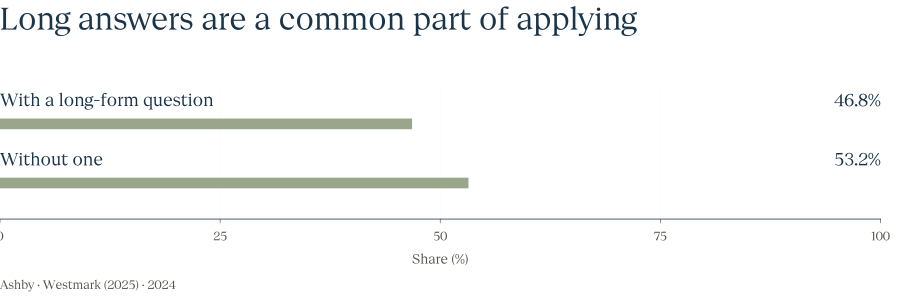
Long answers are a common part of applying


A factual bank of project examples can reduce repeated preparation. Each answer still needs to fit the question.
Sources & calculation notes
Source: Ashby · Westmark (2025)
Abandoned applications are excluded. This measures questions present, not time spent writing or whether a question was required.
- Population
- Submitted applications in Ashby’s sample.
- Measure
- Share associated with forms that include a long-form question; 53.2% is calculated as 100 − 46.8.
- Source location
- Final paragraph and “Roughly Half of Application Forms…” chart.
- Checked
| Group | Value |
|---|---|
| With a long-form question | 46.8% |
| Without one | 53.2% |
Batch what can wait
Some application tasks are time-sensitive. An assessment deadline or a scheduled interview needs its own reminder. Others can wait for a regular review: checking for updates, tidying records, or deciding which opportunities deserve further attention.
That distinction helps prevent the inbox from deciding the shape of every day. If a message requires action now, act. If it does not, give it a place and a time. Turn off notifications for updates that can wait until that review.
A weekly review can be very short. Close out processes that have ended. Add the next action to active ones. Review upcoming deadlines. Decide which new roles are worth preparing for. Then stop maintaining the tracker and return to the search itself.
If your current setup requires constant repair, simplify it. You should be able to update it in a few minutes.
Review, decide, then close the tracker.
A short regular check can replace constant checking.

Close
Mark processes that have ended.
Check
Look at deadlines and upcoming calls.
Choose
Give each active application one next action.
Stop
Return to preparation, conversations, or rest.
Attention back where it helps
Keep separate reminders for anything that cannot wait until the review.
A small application kit
- Use one reliable place for application mail. A dedicated label or folder may be enough. Keep important messages visible and make sure your filtering does not hide a human reply or a time-sensitive assessment invitation.
- Keep login details in a password manager. Label entries by employer and portal so you can find the correct account. Do not store passwords or temporary security codes in a tracker intended for other people to see.
- Maintain a factual source CV. Keep dates and descriptions consistent. Save the tailored version for each application, and review any automatically filled fields before submitting.
- Track one next action. A useful entry might be to check after the stated time to reply, prepare for a scheduled call, or send a requested document.
- Set a regular stopping point. Review the system, decide what matters next, and close it. Leave room for conversations, preparation, learning, and the rest of your life rather than making administration the measure of effort.
For hiring teams
Try your application flow as a candidate would encounter it. Use a phone. Upload a realistic CV. Check whether the process explains what happens next and whether the same information is requested repeatedly. A team can be proud of its internal system while missing how much work it transfers to applicants.
Treat instructions as part of the experience. Make it clear when someone needs an account, what a code is for, and where to ask for help. If a step is necessary, explain it. If nobody can explain why it exists, it is worth reviewing.
At the end of the week, the tracker should let you put the search down for a while. You know what you have sent, what needs attention, and what can wait. The next interview deserves a person with some energy left, and so does the rest of your life.
About this essay
Based on client conversations, with identifying details omitted and examples adapted for clarity.